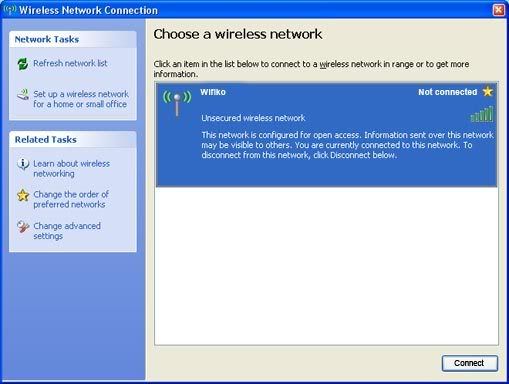
So my asus laptop hasn't been used in about 6 months, and I borrowed it to my old lady. She has wireless in her house, and I know it works, because her parents can connect to it on their laptop. I got to this screen:
http://img.photobucket.com/albums/v423/ ... reen10.jpg" onclick="window.open(this.href);return false;
and it doesn't say there are any connections. How can I fix this? It should be noted that the wireless adapter is turned on, and that the computer is running off of tinyxp and has atheros client on it (Not sure if thats important)
Thanks!
asus 701 wireless problems
Moderator: Moderators
-
ganonbanned
- Senior Member
- Posts: 2211
- Joined: Thu Feb 16, 2006 5:58 pm
- Location: Wisconsin
Re: asus 701 wireless problems
anyones gonna need a lot more info to fix your problem like what model is router and the modem,what service do you get,does wired web work fine.we had problems with my laptop and my parents desktop even though its not wireless.we had to call the dsl people and they replaced the modem and then it worked fine.
-
ganonbanned
- Senior Member
- Posts: 2211
- Joined: Thu Feb 16, 2006 5:58 pm
- Location: Wisconsin
Re: asus 701 wireless problems
windwaker wrote:anyones gonna need a lot more info to fix your problem like what model is router and the modem,what service do you get,does wired web work fine.we had problems with my laptop and my parents desktop even though its not wireless.we had to call the dsl people and they replaced the modem and then it worked fine.
she has a cisco linksys wrt54g2 v. 1.5, broadband internet, and the wireless works fine on her parents laptop and my ipod.
Re: asus 701 wireless problems
Try running "services.msc" and see if "DHCP Client" is enabled. It causes the computer (or at least mine) to not accept IP addresses. I have that problem and it happens just about everytime I boot.
Also, if you can go in the command prompt (run "cmd") and get a screenshot of "ipconfig /all", that could help.
Also, if you can go in the command prompt (run "cmd") and get a screenshot of "ipconfig /all", that could help.
zeturi wrote:If you're getting 404'd when trying to use the links in stickies, try this tutorial to find that juicy info.
-
ganonbanned
- Senior Member
- Posts: 2211
- Joined: Thu Feb 16, 2006 5:58 pm
- Location: Wisconsin
Re: asus 701 wireless problems
every time I type in ipconfig/all, or even just ipconfig, it says " 'ipconfig' is not recognized as an internal or external command, operable program, or batch file"bassmasta wrote:Try running "services.msc" and see if "DHCP Client" is enabled. It causes the computer (or at least mine) to not accept IP addresses. I have that problem and it happens just about everytime I boot.
Also, if you can go in the command prompt (run "cmd") and get a screenshot of "ipconfig /all", that could help.
I may just try reinstalling windows

Re: asus 701 wireless problems
Whoops. I suppose I said it confusing. Go Start -- Run --- cmd then in the black window, type ipconfig /all. Don't type it in the "run" window.
zeturi wrote:If you're getting 404'd when trying to use the links in stickies, try this tutorial to find that juicy info.
-
ganonbanned
- Senior Member
- Posts: 2211
- Joined: Thu Feb 16, 2006 5:58 pm
- Location: Wisconsin
Re: asus 701 wireless problems
I know, thats what I did and thats what happened.bassmasta wrote:Whoops. I suppose I said it confusing. Go Start -- Run --- cmd then in the black window, type ipconfig /all. Don't type it in the "run" window.
Re: asus 701 wireless problems
Hmm. Maybe TinyXP removed that command.
Have you checked the device in Device Manager? All working, drivers good, etc?
Maybe you could try this. (Not specifically using the stuff they use)
Have you checked the device in Device Manager? All working, drivers good, etc?
Maybe you could try this. (Not specifically using the stuff they use)
zeturi wrote:If you're getting 404'd when trying to use the links in stickies, try this tutorial to find that juicy info.