hey guys, noob with question on GCN lcd screen
Moderator: Moderators
hey guys, noob with question on GCN lcd screen
Hello everyone, great site. Ive surfed here many times, but never posted. But now I have a question about screens... Does anyone here know how to make a GCN lcd work on a pc? Ive surfed a lot, My only problem really is hooking it up to the pc...any help is much appreciated!
-
Unidentified Assilant
- Senior Member
- Posts: 2531
- Joined: Thu Oct 21, 2004 12:26 pm
- Location: Yea I like machine head
at pinouts.ru (that may not work, but the website is real), you can get VGA pinouts and RGB pinouts, surely if you connect the right wires (VGA has pins for vertical and horizontal sync) then you should get a nice centered picture on your screen, I've seen Spectrum 128 and VGA mods for PSone screens.
Somebody please buy my Dreamcast >_> £20+shipping

Thats a great start for me, thankyou.... I found the pinout of the connector, here: [url]http://pinouts.ru/data/n64video_pinout.shtml[url]
Now, my vid card has a plug, not sure which type, on it. into this plug goes a cable with a composite video female connector, and into that goes a double ended comp. video male. so in short, If I could rig the screens cord into a comp. video female cable, I would be set. on the pinout for the connector, It has a comp. video cord, But I am not sure how to go about this. Any info ( remember, Im a noob) is appreciated.
It is an interact GCN screen, And I have a Radeon Evil Wizard video out card.
Now, my vid card has a plug, not sure which type, on it. into this plug goes a cable with a composite video female connector, and into that goes a double ended comp. video male. so in short, If I could rig the screens cord into a comp. video female cable, I would be set. on the pinout for the connector, It has a comp. video cord, But I am not sure how to go about this. Any info ( remember, Im a noob) is appreciated.
It is an interact GCN screen, And I have a Radeon Evil Wizard video out card.
-
Unidentified Assilant
- Senior Member
- Posts: 2531
- Joined: Thu Oct 21, 2004 12:26 pm
- Location: Yea I like machine head
-
Guest
There may be another way.... I wonder... There is a A/V Port on the side of the screen ( duh...shouldve mentioned that sooner... ) But a regular red, white, and yellow cable wont fit... they are too small. Is there some adapter I could get for this? If there is, I could simply get the adapter and plug my TV out cable right in.
-
Unidentified Assilant
- Senior Member
- Posts: 2531
- Joined: Thu Oct 21, 2004 12:26 pm
- Location: Yea I like machine head
 .
.-
SpongeBuell
- Senior Member
- Posts: 5190
- Joined: Wed Apr 07, 2004 10:52 am
- Location: Colorado
- Contact:


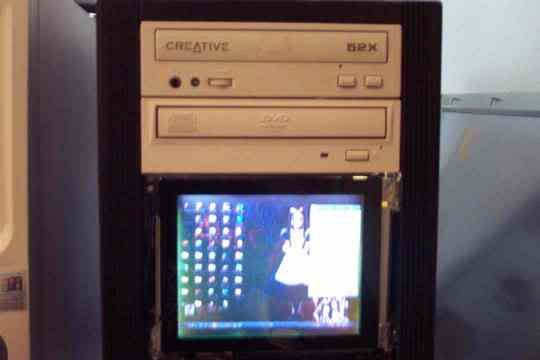
It works great, looks much better in person than in the pic. It is an Interact Gamecube screen, and it was much simpler to hook up than I thought it would be. The screen has a built in A/V In port, so I just took the rca video plug that goes to my video out, and put an adapter over the plug to make it fit. I chopped up the plastic case that the screen was in, And stuck the chip board in the drive bay behind the screen. I then ran the power cord out of an unused slot in the back of my computer, and was done. It looks really good, the only prob is the resolution is not good enough to read lettering, as in words, names of files, etc. but thats what I use my main monitor for. I usually just set up a playlist of music videos, then turn my main monitor off, and let them play on the screen. The adapter I used can be found here:
http://www.radioshack.com/product.asp?c ... &hp=search
Oh, and yes, you can see the mouse.
http://www.radioshack.com/product.asp?c ... &hp=search
Oh, and yes, you can see the mouse.