I found this data sheet.
http://www.rohm.com/products/databook/g ... 1a-w-e.pdf
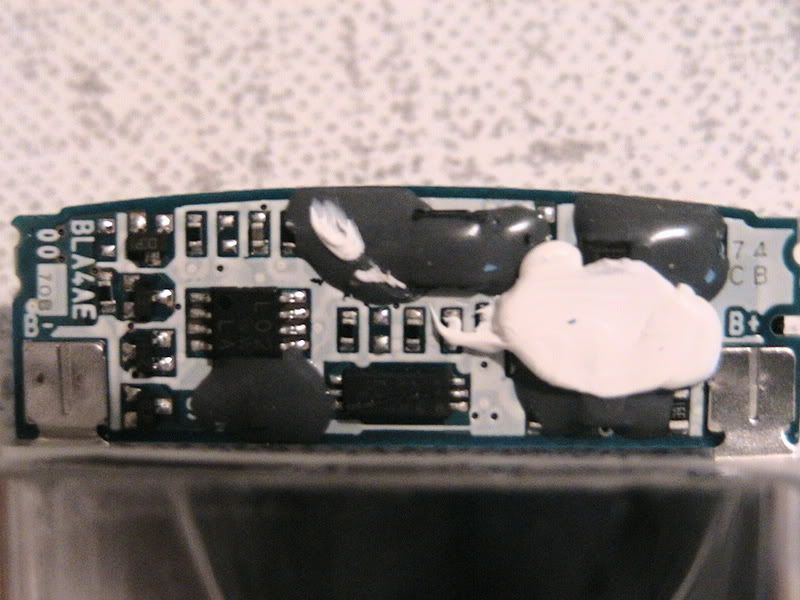
If this is correct then pin #4 is the ground pin on the L02 IC.
Can anyone confirm this is the data sheet for the EEPROM on the Battery.
OKOAOMO
Here is a PIC of the #4 PIN
http://img143.imageshack.us/img143/6121 ... altxw3.jpg
TUTORIAL: Make a Pandora's Battery without a homebrew PSP!
Moderator: Moderators
-
L33t_Revanent
- Posts: 6
- Joined: Fri Nov 09, 2007 9:05 pm
- Contact:
-
jedi knight
- Posts: 644
- Joined: Sun Jan 22, 2006 3:05 pm
-
L33t_Revanent
- Posts: 6
- Joined: Fri Nov 09, 2007 9:05 pm
- Contact:

CFW 3.60 M33 right out of the box
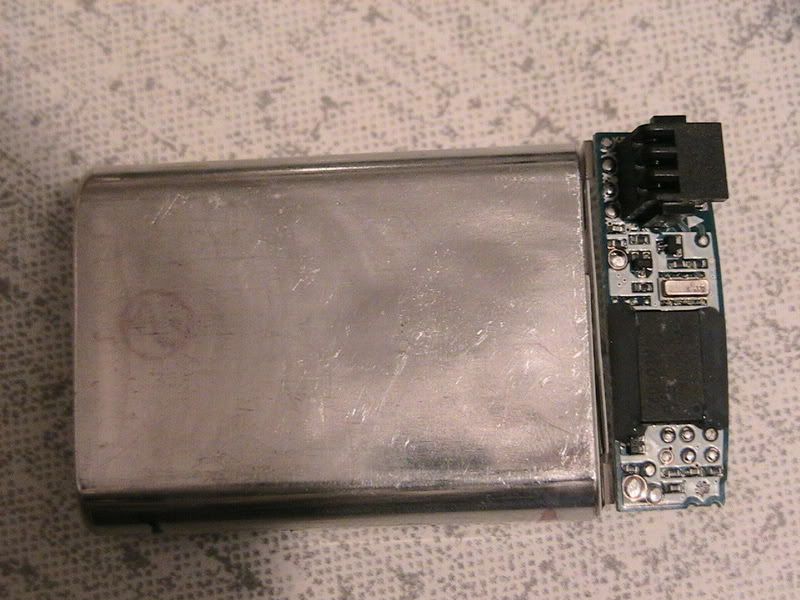
I finally got a psp slim the other day, this is the core version for $169.00 at Target. It had OFW 3.60 on it. I bought an extra battery at Walmart and unbeknownst to me at the time, this was a fat battery that I was purchasing.
So, I performed the hard mod on the fat battery. It went well, and thought I would describe it in detail, because believe me, there's a lot of info out on the net about doing this, most are dead ends, rants, videos, downloads, countless open web pages, and off subject dribble.
This has to be one of the most annoying mods I've ever seen. Even the
so called guides are gay. But anyway, here's how I did it, of course after all of the above that I went thru:
1: Performed hard mod on the battery. It's a Sony PSP-110 battery, made in Japan. Used a helping hand(available at Radio Shack) to hold and magnify what I'm doing. I also used strips of electrical tape all around the area I was working on so nothing would inadvertantly get touched. So the only thing you see is leg #5, the one you need to disconnect. The tape helps because it covers up the adjacent leg #6 whic you do not want to touch. I lodged a small thin pin behind the #5 leg and applied heat(about 1 second) from the soldering tip and pulled up on the leg. The leg of chip actually broke off. But nothing else was touched.
2. I tested the battery out, the PSP power light was on, but no screen light.
It appeared bricked. But, I put the slim battery in that came with the PSP and it powered up just fine.
3. I then ran the TOTALNewbieasyInstallerPandorasmenu program with no battery, but thru the charger. This program created a good MS to boot. I tried many others out there, but this program created the right MS to boot from.
4. I Unplugged the USB and charger, and booted with the modded battery and it booted to a blank black screen, I hit X, and the PSP then powered off after a second or two.
5. Removed the modded battery, and put the battery that came with the slim in and powered up. Now I am running 3.60 M33!!!
I'm sure you all know how to find the files you need/want for your PSP, and are familar with the mod and know how to use the programs that install these files. So don't ask/post stupid questions. Hopefully what I posted here helps anyone who is stuck or have tried things that are not working. This shows you that you can just pull your new PSP Slim right out of the box and be on a CFW in no time.
I'm not saying this will work for all slims or all people. But this worked well for me.
have fun!
[/img]
So, I performed the hard mod on the fat battery. It went well, and thought I would describe it in detail, because believe me, there's a lot of info out on the net about doing this, most are dead ends, rants, videos, downloads, countless open web pages, and off subject dribble.
This has to be one of the most annoying mods I've ever seen. Even the
so called guides are gay. But anyway, here's how I did it, of course after all of the above that I went thru:
1: Performed hard mod on the battery. It's a Sony PSP-110 battery, made in Japan. Used a helping hand(available at Radio Shack) to hold and magnify what I'm doing. I also used strips of electrical tape all around the area I was working on so nothing would inadvertantly get touched. So the only thing you see is leg #5, the one you need to disconnect. The tape helps because it covers up the adjacent leg #6 whic you do not want to touch. I lodged a small thin pin behind the #5 leg and applied heat(about 1 second) from the soldering tip and pulled up on the leg. The leg of chip actually broke off. But nothing else was touched.
2. I tested the battery out, the PSP power light was on, but no screen light.
It appeared bricked. But, I put the slim battery in that came with the PSP and it powered up just fine.
3. I then ran the TOTALNewbieasyInstallerPandorasmenu program with no battery, but thru the charger. This program created a good MS to boot. I tried many others out there, but this program created the right MS to boot from.
4. I Unplugged the USB and charger, and booted with the modded battery and it booted to a blank black screen, I hit X, and the PSP then powered off after a second or two.
5. Removed the modded battery, and put the battery that came with the slim in and powered up. Now I am running 3.60 M33!!!
I'm sure you all know how to find the files you need/want for your PSP, and are familar with the mod and know how to use the programs that install these files. So don't ask/post stupid questions. Hopefully what I posted here helps anyone who is stuck or have tried things that are not working. This shows you that you can just pull your new PSP Slim right out of the box and be on a CFW in no time.
I'm not saying this will work for all slims or all people. But this worked well for me.
have fun!
[/img]
Re: Data Sheet
I have the same battery and a expendable battery so I decided to try it...okoaomo wrote:I found this data sheet.
http://www.rohm.com/products/databook/g ... 1a-w-e.pdf
If this is correct then pin #4 is the ground pin on the L02 IC.
Can anyone confirm this is the data sheet for the EEPROM on the Battery.
OKOAOMO
Here is a PIC of the #4 PIN
http://img143.imageshack.us/img143/6121 ... altxw3.jpg
I opened up the battery located the pin and with a razor blade and some tape (to avoid short circuiting anything) I sent the darn ground pin to meet his make, and what a fierce battle that was, epic even!
Finally I cut the pin, out everything back together nice and snug, turn on the PSP and....to my surprise.....
Nothing!
Seems to take a tiny bit longer but eventually it turns on, normal PSP mode..
In conclusion that's the ground pin from what I reckon, just the wrong chip.
Re: CFW 3.60 M33 right out of the box
Yep.. I have the exact same setup and it worked great. From all the forums I read, they say the Made in Japan version of the Sony PSP-100 should not work...but mine worked just fine. I recommend doing a NAND backup before going thru the entire process though.rxpc wrote:I finally got a psp slim the other day, this is the core version for $169.00 at Target. It had OFW 3.60 on it. I bought an extra battery at Walmart and unbeknownst to me at the time, this was a fat battery that I was purchasing.
So, I performed the hard mod on the fat battery. It went well, and thought I would describe it in detail, because believe me, there's a lot of info out on the net about doing this, most are dead ends, rants, videos, downloads, countless open web pages, and off subject dribble.
This has to be one of the most annoying mods I've ever seen. Even the
so called guides are gay. But anyway, here's how I did it, of course after all of the above that I went thru:
1: Performed hard mod on the battery. It's a Sony PSP-110 battery, made in Japan. Used a helping hand(available at Radio Shack) to hold and magnify what I'm doing. I also used strips of electrical tape all around the area I was working on so nothing would inadvertantly get touched. So the only thing you see is leg #5, the one you need to disconnect. The tape helps because it covers up the adjacent leg #6 whic you do not want to touch. I lodged a small thin pin behind the #5 leg and applied heat(about 1 second) from the soldering tip and pulled up on the leg. The leg of chip actually broke off. But nothing else was touched.
2. I tested the battery out, the PSP power light was on, but no screen light.
It appeared bricked. But, I put the slim battery in that came with the PSP and it powered up just fine.
3. I then ran the TOTALNewbieasyInstallerPandorasmenu program with no battery, but thru the charger. This program created a good MS to boot. I tried many others out there, but this program created the right MS to boot from.
4. I Unplugged the USB and charger, and booted with the modded battery and it booted to a blank black screen, I hit X, and the PSP then powered off after a second or two.
5. Removed the modded battery, and put the battery that came with the slim in and powered up. Now I am running 3.60 M33!!!
I'm sure you all know how to find the files you need/want for your PSP, and are familar with the mod and know how to use the programs that install these files. So don't ask/post stupid questions. Hopefully what I posted here helps anyone who is stuck or have tried things that are not working. This shows you that you can just pull your new PSP Slim right out of the box and be on a CFW in no time.
I'm not saying this will work for all slims or all people. But this worked well for me.
have fun!
[/img]
Re: CFW 3.60 M33 right out of the box
Yep.. I have the exact same setup and it worked great. From all the forums I read, they say the Made in Japan version of the Sony PSP-110 should not work...but mine worked just fine. I recommend doing a NAND backup before going thru the entire process though.rxpc wrote:I finally got a psp slim the other day, this is the core version for $169.00 at Target. It had OFW 3.60 on it. I bought an extra battery at Walmart and unbeknownst to me at the time, this was a fat battery that I was purchasing.
So, I performed the hard mod on the fat battery. It went well, and thought I would describe it in detail, because believe me, there's a lot of info out on the net about doing this, most are dead ends, rants, videos, downloads, countless open web pages, and off subject dribble.
This has to be one of the most annoying mods I've ever seen. Even the
so called guides are gay. But anyway, here's how I did it, of course after all of the above that I went thru:
1: Performed hard mod on the battery. It's a Sony PSP-110 battery, made in Japan. Used a helping hand(available at Radio Shack) to hold and magnify what I'm doing. I also used strips of electrical tape all around the area I was working on so nothing would inadvertantly get touched. So the only thing you see is leg #5, the one you need to disconnect. The tape helps because it covers up the adjacent leg #6 whic you do not want to touch. I lodged a small thin pin behind the #5 leg and applied heat(about 1 second) from the soldering tip and pulled up on the leg. The leg of chip actually broke off. But nothing else was touched.
2. I tested the battery out, the PSP power light was on, but no screen light.
It appeared bricked. But, I put the slim battery in that came with the PSP and it powered up just fine.
3. I then ran the TOTALNewbieasyInstallerPandorasmenu program with no battery, but thru the charger. This program created a good MS to boot. I tried many others out there, but this program created the right MS to boot from.
4. I Unplugged the USB and charger, and booted with the modded battery and it booted to a blank black screen, I hit X, and the PSP then powered off after a second or two.
5. Removed the modded battery, and put the battery that came with the slim in and powered up. Now I am running 3.60 M33!!!
I'm sure you all know how to find the files you need/want for your PSP, and are familar with the mod and know how to use the programs that install these files. So don't ask/post stupid questions. Hopefully what I posted here helps anyone who is stuck or have tried things that are not working. This shows you that you can just pull your new PSP Slim right out of the box and be on a CFW in no time.
I'm not saying this will work for all slims or all people. But this worked well for me.
have fun!
[/img]
-
MediaManiacPSP
- Posts: 22
- Joined: Sat Oct 06, 2007 8:52 pm
although ive never tried it, logically it should work(the pin was that way to begin with your just restoring it back to its original state)...dmurphy wrote:is it possible too make the battery a regular battery again to play games with? like re-soldering maybe?
also is psp-s110 supported? (made in japan)
you must have really good sodering skills though


 [/img]
