Help with thy Sega Portable
Moderator: Moderators
-
bicostp
- Moderator
- Posts: 10491
- Joined: Mon Mar 07, 2005 5:47 pm
- Steam ID: bicostp
- Location: Spamalot
- Contact:
Press the "Print Screen" button, open Paint, and hit Paste (Ctrl+V)
Of course you can use 3rd party programs for this as well.
(And on Classic Mac OS [9 and under] the shortcut is Command+Shift+3, and it saves a MacPaint/PICT file on the root hard drive window named "Screenshot1")
Of course you can use 3rd party programs for this as well.
(And on Classic Mac OS [9 and under] the shortcut is Command+Shift+3, and it saves a MacPaint/PICT file on the root hard drive window named "Screenshot1")
Twitter
http://www.pcwgaming.com" onclick="window.open(this.href);return false;
If you want a Dropbox account, please use my referral link
http://www.pcwgaming.com" onclick="window.open(this.href);return false;
If you want a Dropbox account, please use my referral link


-
bicostp
- Moderator
- Posts: 10491
- Joined: Mon Mar 07, 2005 5:47 pm
- Steam ID: bicostp
- Location: Spamalot
- Contact:
Above the directional arrows... over the cluster above that... right above the "insert" key.
It probably says this:
Back in the DOS days, it literally printed the contents of your screen onto the printer. Nowadays it just puts the screenshot in the clipboard, ready to be pasted.
It probably says this:
Code: Select all
Print
Screen
----------
SysRqTwitter
http://www.pcwgaming.com" onclick="window.open(this.href);return false;
If you want a Dropbox account, please use my referral link
http://www.pcwgaming.com" onclick="window.open(this.href);return false;
If you want a Dropbox account, please use my referral link
 i thought it was an on-screen button
-
nos_slived
- Higher Idiot
- Posts: 3476
- Joined: Mon Mar 21, 2005 6:32 pm
- Location: Burnaby, BC, Canada
- Contact:
So he said. He posted pictures, but he could've gone to a skateboard park and taken pictures of some random black guy.soundwave wrote:IFR was black.
Last edited by nos_slived on Mon Jul 11, 2005 3:20 am, edited 1 time in total.


-
S q u e e !
- Posts: 835
- Joined: Wed Feb 16, 2005 11:31 am
- Location: Lost. Are you my mommy?
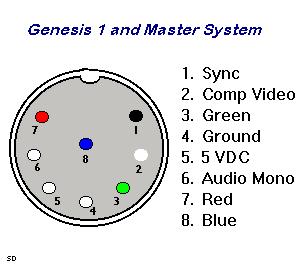
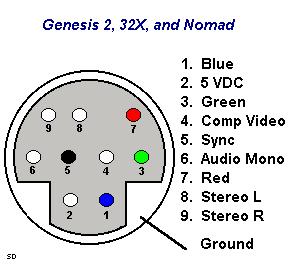
I have another question. I'm hardwiring the Video, L audio and R audio into my genesis two, and I wonder if I need to worry about the "5VDC" pin in the diagram, or if that is used with pocket tv's and the like.Reploid Ayla wrote:hey man, this is what i got after google-ing and clicking the first link.
peace
"I like my coffee like I like my women. In a plastic cup."
~Eddie Izzard
~Eddie Izzard

I wouldn't worry about the 5VDC, it just outputs 5V. All you need is Video, either composite or RGB and left and right audio.
demonfaj, you say you are using headphones, is this the headphones onthe LCD? If so, how are you going to get the sound from the genesis to the LCD
Unidentified Assailant, RGB and S-Video are very common in the UK. RGB (as you point out) is usually transferred via a scart lead (both the DVD player and TV have to be RGB enabled) S-video is through a DIN soocket that almost looks like a P/S2 mouse connector.
demonfaj, you say you are using headphones, is this the headphones onthe LCD? If so, how are you going to get the sound from the genesis to the LCD
Unidentified Assailant, RGB and S-Video are very common in the UK. RGB (as you point out) is usually transferred via a scart lead (both the DVD player and TV have to be RGB enabled) S-video is through a DIN soocket that almost looks like a P/S2 mouse connector.