Anyone ever wire up a Sega game gear to play on their TV?
Moderator: Moderators
Anyone ever wire up a Sega game gear to play on their TV?
Is it possible to wire up a Sega Game gear to a TV? If so anyone know how to go about doing it? Thanks
-
lovablechevy
- Portablizer Extraordinaire
- Posts: 1104
- Joined: Wed Nov 01, 2006 3:09 pm
- Location: busy with a project
- Contact:
it is possible, but a very difficult mod is required to do it.
i don't have the time now to go into it, but i'll try sometime over the weekend to give you proper links and instructions and such.
i don't have the time now to go into it, but i'll try sometime over the weekend to give you proper links and instructions and such.
they call me the Queen of Bondo, though maybe i should be called the Queen of Epoxy Putty
current project - code name: blue mushroom!
current project - code name: blue mushroom!
-
lovablechevy
- Portablizer Extraordinaire
- Posts: 1104
- Joined: Wed Nov 01, 2006 3:09 pm
- Location: busy with a project
- Contact:
just as a precautionary warning, this mod is not for the light of heart. it's difficult, confusing, and you need to know quite a lot about the specific game gear you have. you also need to have excellent soldering skills.
but i'll go into all of that later when i have time.
but i'll go into all of that later when i have time.
they call me the Queen of Bondo, though maybe i should be called the Queen of Epoxy Putty
current project - code name: blue mushroom!
current project - code name: blue mushroom!
-
lovablechevy
- Portablizer Extraordinaire
- Posts: 1104
- Joined: Wed Nov 01, 2006 3:09 pm
- Location: busy with a project
- Contact:
just want you to know i haven't forgotten about this, i've just been insanely busy (with the moving and family being here the past week).
i hope to get all the information together this weekend and get it up for you.
i hope to get all the information together this weekend and get it up for you.
they call me the Queen of Bondo, though maybe i should be called the Queen of Epoxy Putty
current project - code name: blue mushroom!
current project - code name: blue mushroom!
-
lovablechevy
- Portablizer Extraordinaire
- Posts: 1104
- Joined: Wed Nov 01, 2006 3:09 pm
- Location: busy with a project
- Contact:
that's not the only method, thank you. it only works with 1 type of gg.
they call me the Queen of Bondo, though maybe i should be called the Queen of Epoxy Putty
current project - code name: blue mushroom!
current project - code name: blue mushroom!
-
lovablechevy
- Portablizer Extraordinaire
- Posts: 1104
- Joined: Wed Nov 01, 2006 3:09 pm
- Location: busy with a project
- Contact:
i apologize for my delay. i promise to have the info up by tonight.
they call me the Queen of Bondo, though maybe i should be called the Queen of Epoxy Putty
current project - code name: blue mushroom!
current project - code name: blue mushroom!
-
lovablechevy
- Portablizer Extraordinaire
- Posts: 1104
- Joined: Wed Nov 01, 2006 3:09 pm
- Location: busy with a project
- Contact:
ok, it's about time that i get this info in here...
as stated before, these mods are not for beginners. the soldering is small, extremely precise, and difficult. if you do not have great soldering skills, then you need to either pass this mod up or get to work on improving. make sure you read over all the info before attempting anything!! i cannot be held responsible for any damages that may occure from attempting this mod. to your system, electrical parts, or person. attempt the following at your own risk. you have been warned.
on to the info.
first of all, it is very important to know which game gear you have before you start deciding which of these mods to do. how can you tell what game gear you have? simple! open it up and flip it to the back side of the board. look in the lower right hand corner and see how many asic chips there are. if there are 2 chips, you have an older game gear and have the choice of doing either of the two available mods. if there is only 1 chip, you only have the choice of doing one of the following mods.
so let's get started.
mod option #1: for the older 2 chip ggs only
first, it is a very excellent idea to read the gamegear-tv thread at the sms forums. segasonicfan has created the easiest schematic to follow.

borrowed from segasonicfan
using the above schematic, connect the tv out board to the gg as indicated here:
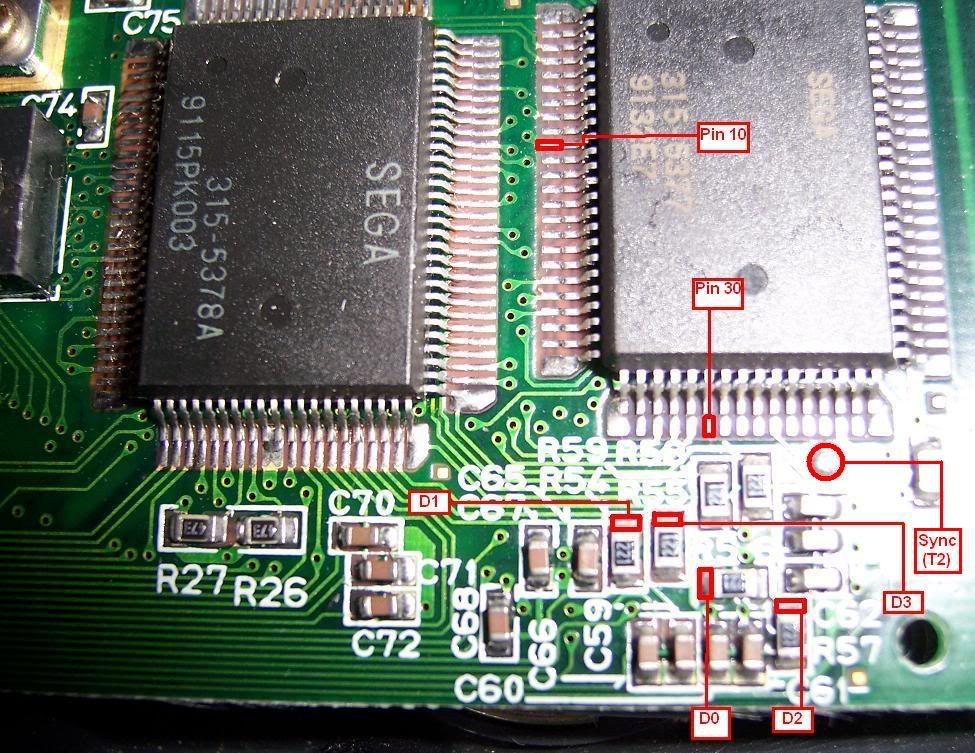
borrowed from segasonicfan
i have not personally done this mod. i can only give you the info and some other sites that discuss it.
site 1
site 2
mod option #2: for both the older 2 chip and newer 1 chip ggs
ok, on to the mod i have experience with. i can tell you from experience that this mod is damn hard. all the information needed for it can be found here. the schematic is a lot more difficult:

borrowed from tim
depending on which gg you have, use one of the following to connect your board up to the gg:
1 chip

borrowed from tim
2 chip

borrowed from tim
if you do all of this successfully, you should have something that looks like this:


i know that the site is hooking it up to a scart connector, but you can use it to hook it up to an ntsc tv as long as it accepts rgb.
hooking up to a psone screen
i am still ironing out the issues with using a screen instead of a tv with this mod. for some reason, it comes out in black & white.

you connect the rgb to the psone screen as follows:

if there are any questions, i will be glad to try and answer them. as soon as i figure out hooking it up to a psone screen, i'll update with the info here.
as stated before, these mods are not for beginners. the soldering is small, extremely precise, and difficult. if you do not have great soldering skills, then you need to either pass this mod up or get to work on improving. make sure you read over all the info before attempting anything!! i cannot be held responsible for any damages that may occure from attempting this mod. to your system, electrical parts, or person. attempt the following at your own risk. you have been warned.
on to the info.
first of all, it is very important to know which game gear you have before you start deciding which of these mods to do. how can you tell what game gear you have? simple! open it up and flip it to the back side of the board. look in the lower right hand corner and see how many asic chips there are. if there are 2 chips, you have an older game gear and have the choice of doing either of the two available mods. if there is only 1 chip, you only have the choice of doing one of the following mods.
so let's get started.
mod option #1: for the older 2 chip ggs only
first, it is a very excellent idea to read the gamegear-tv thread at the sms forums. segasonicfan has created the easiest schematic to follow.
borrowed from segasonicfan
using the above schematic, connect the tv out board to the gg as indicated here:
borrowed from segasonicfan
i have not personally done this mod. i can only give you the info and some other sites that discuss it.
site 1
site 2
mod option #2: for both the older 2 chip and newer 1 chip ggs
ok, on to the mod i have experience with. i can tell you from experience that this mod is damn hard. all the information needed for it can be found here. the schematic is a lot more difficult:
borrowed from tim
depending on which gg you have, use one of the following to connect your board up to the gg:
1 chip
borrowed from tim
2 chip
borrowed from tim
if you do all of this successfully, you should have something that looks like this:
i know that the site is hooking it up to a scart connector, but you can use it to hook it up to an ntsc tv as long as it accepts rgb.
hooking up to a psone screen
i am still ironing out the issues with using a screen instead of a tv with this mod. for some reason, it comes out in black & white.
you connect the rgb to the psone screen as follows:
if there are any questions, i will be glad to try and answer them. as soon as i figure out hooking it up to a psone screen, i'll update with the info here.
they call me the Queen of Bondo, though maybe i should be called the Queen of Epoxy Putty
current project - code name: blue mushroom!
current project - code name: blue mushroom!
-
bacteria
- Portablizer Extraordinaire
- Posts: 3984
- Joined: Fri Apr 20, 2007 12:14 am
- Location: Hampshire, UK
- Contact:
Silly question lovablechevy - is the GG and PSone screen both PAL or NTSC - if the GG is in PAL mode and your screen is NTSC then it would explain why the image is black and white (or vice-versa). Just wondering, sometimes a mod works in one mode and not the other. Do you have a composite video output to the PSone screen from the GG or only RGB? (could be a way to get c-sync).
Just making a few guesses, I don't know anything about the GG.
Just making a few guesses, I don't know anything about the GG.

-
lovablechevy
- Portablizer Extraordinaire
- Posts: 1104
- Joined: Wed Nov 01, 2006 3:09 pm
- Location: busy with a project
- Contact:
i don't own any pal systems or screens.bacteria wrote:Silly question lovablechevy - is the GG and PSone screen both PAL or NTSC - if the GG is in PAL mode and your screen is NTSC then it would explain why the image is black and white (or vice-versa). Just wondering, sometimes a mod works in one mode and not the other. Do you have a composite video output to the PSone screen from the GG or only RGB? (could be a way to get c-sync).
Just making a few guesses, I don't know anything about the GG.
also, rgb is not pal or ntsc specific.
there is no way to get composite out from the gg.
i already know what the problem is, i just need to take the time to experiment with the correct components to fix it.
they call me the Queen of Bondo, though maybe i should be called the Queen of Epoxy Putty
current project - code name: blue mushroom!
current project - code name: blue mushroom!