I would use my existing battery but I would have to buy another and I don't have great soldering skills so I figured that that would be a viable option for me.
Regards
TUTORIAL: Make a Pandora's Battery without a homebrew PSP!
Moderator: Moderators
<a href="http://www.us.playstation.com/PSN/Users/bay_wolf"><img src="http://pid.us.playstation.com/user/bay_wolf.jpg" width="235" height="149" border="0"></a>

-
MediaManiacPSP
- Posts: 22
- Joined: Sat Oct 06, 2007 8:52 pm
 Ah yes understandable, I was hesitant as well. This is why I've kept mine in that mode and sealed it back up with tape as I cant soder things good
  I did manage to do it on the first try lucky me. I just had patience with it and everything worked out. I found it was easy to do, when your well prepared with all the right info and tools and you have a bit of patience and take your time. This way is not for the faint hearted thats for sure
MM
this is also a question i need to be ansereed.netoo wrote:
I have a psp-110 battery model with the same small board
==> http://img440.imageshack.us/img440/2041/110abc8.jpg
==> http://img187.imageshack.us/img187/4272/110bpv7.jpg
My questions are :
1) Can I with this model transform the battery in Pandora ?
2) If yes, which is the modification I must make ?


also.my psp is also the small board.
which pin do i cut.?
-
crpngdth2001
- Posts: 1
- Joined: Thu Oct 25, 2007 8:27 pm
I just can't win. First the "Made in China" PSP-280 w/ the Japanese packaging (Fake Battery), and now I decide to use the original (the PSP Fat is 1.5 yrs old) PSP-110, and it's the battery with the "small" board, that doesn't even have the chip on it. It is from a TA-082 unit. Like everyone else, I'm guessing this genuine Sony PSP-110 can't be modded either? I give up......
-
jaydeegigadee
- Posts: 1
- Joined: Fri Oct 26, 2007 12:15 pm
- Location: Michigan
I'm stuck here, I have a bricked PHAT PsP and ran the Pandoras GUI_v1.5 with a card reader and that didn't work. I ran the NewbeasyInstaller(about 8x) and when the wifi/ms lights came on I pushed square and let it sit for more than five minutes and it didn't ever power down. I have a "bent pin" PSP-280 pandora battery that makes the PSP turn on when I insert it but it doesn't turn the wifi/ms lights on unless there's a memory card in it. I've tried all the Newbeasy options but none have gotten me farther than that. The only thing I haven't done is get the MS files from someone that has them. If someone could PM me a link or the files or just give some advice it would be much appreciated.
Forgot to mention: The wifi/ms lights stay lit. They don't blink at all they both just stay on.
Forgot to mention: The wifi/ms lights stay lit. They don't blink at all they both just stay on.
pandora battery PSP-S110 picture
I used the PSP-S110 battery and cut the pcp copper, here is a picture.
This works, and there is not so much risk in blowing up you're house!!

This works, and there is not so much risk in blowing up you're house!!
I need help with the same problem.tuku555 wrote:this is also a question i need to be ansereed.netoo wrote:
I have a psp-110 battery model with the same small board
==> http://img440.imageshack.us/img440/2041/110abc8.jpg
==> http://img187.imageshack.us/img187/4272/110bpv7.jpg
My questions are :
1) Can I with this model transform the battery in Pandora ?
2) If yes, which is the modification I must make ?
also.my psp is also the small board.
which pin do i cut.?
I've looked everywhere adn the chip is not the same and as you can see in the pictures nothing is written on the board.
-
sparkul2007
- Posts: 1
- Joined: Sat Nov 03, 2007 5:52 am
iam7805 @ http://forums.benheck.com/viewtopic.php?t=21280
Hi
Wonder if anyone can help? I've followed the instructions regarding the making of a Pandora battery as you say not for the faint hearted. I've now got a PSP 1000 with a green flashing power light but the PSP will still not switch on into service mode to down grade the software from 3.60.
Just as a point of interest the PSP is a Jap import into the UK the software upgrade used was from the UK Sony site the battery type is a 110.
Any ideas where I go from here? have I done something wrong?
Wonder if anyone can help? I've followed the instructions regarding the making of a Pandora battery as you say not for the faint hearted. I've now got a PSP 1000 with a green flashing power light but the PSP will still not switch on into service mode to down grade the software from 3.60.
Just as a point of interest the PSP is a Jap import into the UK the software upgrade used was from the UK Sony site the battery type is a 110.
Any ideas where I go from here? have I done something wrong?
This is how I put custom firmware 3.71 m33 on my PSP slim with only a
1) PSP slim firmware 3.60
2) PSP-S110 battery (hardware Pandora)
3) memory stick Sony PRO Duo 512MB
downloaded a file with the name "14749_TOTALNewbieasyInstallerPandorasmenu.rar" 140MB
and run START.exe
Now I have this on my 512 memory stick: (x is my memory stick)
x:\kd
x:\PSP
x:\registry
msipl.bin
371.PBP
M33_371_INSTALL_LOG.TXT
All this is (25.673.671 bytes)
When I put the memory stick in my psp and put the battery in it I needed to wait some minutes and I noticed that the screen was black but the orange hd led was busy after a while the psp shut down and I rebooted and after that i had to reset my flash in the recovery menu.
And now I have a psp slim with 3.71 m33.
Hoop this will help someone
1) PSP slim firmware 3.60
2) PSP-S110 battery (hardware Pandora)
3) memory stick Sony PRO Duo 512MB
downloaded a file with the name "14749_TOTALNewbieasyInstallerPandorasmenu.rar" 140MB
and run START.exe
Now I have this on my 512 memory stick: (x is my memory stick)
x:\kd
x:\PSP
x:\registry
msipl.bin
371.PBP
M33_371_INSTALL_LOG.TXT
All this is (25.673.671 bytes)
When I put the memory stick in my psp and put the battery in it I needed to wait some minutes and I noticed that the screen was black but the orange hd led was busy after a while the psp shut down and I rebooted and after that i had to reset my flash in the recovery menu.
And now I have a psp slim with 3.71 m33.
Hoop this will help someone
this is great because now i can downgrade wherein before i had no way of downgrading. (no one around me with CFW to make pandora, i have 3.52, blah blah blah...) but i have just one question. what do i do if my official sony 3.6v 1800mAh battery pack, doesnt have the same thing on the inside?
here are pictures of my battery (psp phat);
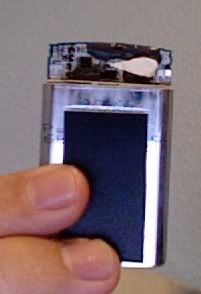
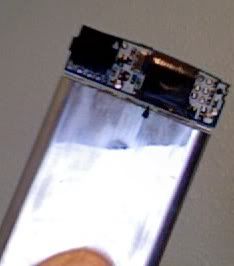
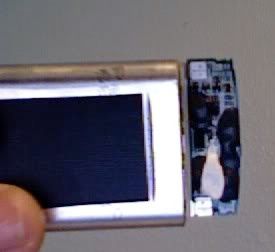
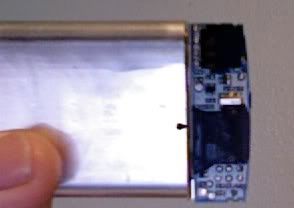
here are pictures of my battery (psp phat);
I never tried to make a Pandora battery based on the photos that you showed, but the Idea is to disable the eprom by removing the minus from the eprom and leaving everything else intact.
First try to find a photo of the same type of batery that you have and if you can not find one try this as last resort!!!!
<B>If you like to guess you can do this:</B>
1) Try to find a IC (black square block) white 4 pins on one side and 4 on the other
2) Try to find the pin that is the minus, if you have a multimeter you can try to figure out what the minus is by checking the following
First try to find a photo of the same type of batery that you have and if you can not find one try this as last resort!!!!
<B>If you like to guess you can do this:</B>
1) Try to find a IC (black square block) white 4 pins on one side and 4 on the other
2) Try to find the pin that is the minus, if you have a multimeter you can try to figure out what the minus is by checking the following
- a) The minus is most of the time connected to the battery minus
b) The minus is most of the time connected to one of the pins on every IC (black square blocks)
I've got that Piece of Sh*t Bat Too...
Man I cant find NE1 who has actually figured out this MYSTERY Battery......
Please POST if you have had any luck "Pandora-ing" This Just my Luck I've got one of the few batteries that doesnt look like the picture.
This Is Driving Me Crazzzzyyyy.......
Please POST if you have had any luck "Pandora-ing" This Just my Luck I've got one of the few batteries that doesnt look like the picture.
This Is Driving Me Crazzzzyyyy.......