PSOne Screen speaker/amp problem SOLVED!

If you're making a portable you probably need something to watch it on. (Unless you want to guess what's happening in the game, but I wouldn't advise that) Anyway, this forum is your "Hacking a pocket TV/screen" one-stop solution. Share your experiences and knowledge here.

Moderator: Moderators

segasonicfan
Moderator
Posts: 516
Joined: Fri Jul 23, 2004 3:57 am

PSOne Screen speaker/amp problem SOLVED!

Post by segasonicfan »

I'm a perfectionist when it comes to my video quality. That said, there is one disturbing problem with the PSOne and its built in speaker amp. When using a system (most notably the PS2) that has more volume output than others, the base sound messed up the screen (when it was at full volume). This bothered the crap out of me so I set out to fix it...

I first tried removing the 7805 from the LM4385 and adding a 5v power source with more current. Suprisingly, this didn't help at all. Then, however, I traced all the 5v output lines from the reg and found that it splits several ways: all the traces but one run to the audio amp and the one other trace runs south...towards the LM1881 sync seperator.

That explains it all...the current draw from the base (no matter how much available) was intercepting the sync signal...so I cut the trace between the audio amp and the sync stuff and plugged in a 5v source seperately to the too and....voila! perfect bass/audio output WITH perfect video signal :)

....hopefully somebody found that enlightening...lol

-Segasonicfan
Kurt_
Portablizer
Posts: 5748
Joined: Thu Nov 24, 2005 10:32 am
Steam ID: kurbert
Location: Ontario, Canada
Contact:

Post by Kurt_ »

From what I read (the first half of the first sentence of the first 2 paragraphs, and the last part of the last one), all I have to say is

HOORAY!!!
Hey, sup?
marshallh
Moderator
Posts: 2987
Joined: Sat Sep 10, 2005 2:17 pm
360 GamerTag: marshallh
Location: here and there
Contact:

Post by marshallh »

Thanks for figuring that out... At first I thought it was my cheap batteries but I was wrong!

I wonder how much power one could save if they used 5v switching power supplies instead of the 7805s on the PSone board.
Image
superdeformed
Portablizer Extraordinaire
Posts: 298
Joined: Thu Mar 03, 2005 4:45 pm

Post by superdeformed »

I was (well, still am technically) having the same problem with my first portable N64. I figured it had something to do with power draw but never really looked into, so, very helpful indeed :D. I don't suppose you measured how much current the two lines draw (audio and LM1881) after you seperated them?
segasonicfan
Moderator
Posts: 516
Joined: Fri Jul 23, 2004 3:57 am

Post by segasonicfan »

I guess I could measure that. The sync stuff I know draws next to nothing because I hooked it up to the other 7805 output and it easily powered both (although the video wasnt perfect because it was sharing the power source again). As for the amp, according to the datasheet the max power draw is 2W, so current draw should be around 400mah with possible spikes when the bass hits. I can measure it later on for 100% accuracy though.

Basically, I would recommend cutting the trace and adding another 7805. this would raise the overall power usage of the screen up a little but I think it's definitely worth it.

Marshall, the problem other 5v supplies is the line regulation...for the same problem as the speaker bass you must have seperate 5v supplies for the sync and video....which means 3 differetn supplies :( Also, despite popular belief the PSOne screen DOES require 7.5v for it's maini circuit, it does not simply run off 5v alone :(

-Segasonicfan
segasonicfan
Moderator
Posts: 516
Joined: Fri Jul 23, 2004 3:57 am

Post by segasonicfan »

UPDATE:
I found a better power efficient way to make use of this info... :-) Rather than using the 7805 on the PSone LCD for the sync line (which works perfectly by the way), I tried hooking up the +5v output from my PS2 and...success!! You can use the +5v line output from all your A/V consoles to power the seperate sync info :) The audio amp apparently draws to much but the sync part (once seperated) will work perfectly.

The audio amp still draws too much from the remaining 7805 unfortunately, so I'm going to take it out. I'm trying a MC34063 (1.6A DC-DC conv) for both the screen power and the audio amp power. I'll keep you all posted on the results.........

-Segasonicfan
segasonicfan
Moderator
Posts: 516
Joined: Fri Jul 23, 2004 3:57 am

Post by segasonicfan »

UPDATE:
I have found that this is NOT an ultimate fix to the problem :( This fix only works if using a seperate 5v supply for the amp. Even if you're drawing 5v from a separate regulator that comes from the originals power supply the problem will STILL be there! >:( Appearently it's a grounding problem and I'm looking into solving it. I *FINALLY* found the PDF for the circuit next to the LM1881!!!

http://www.njr.co.jp/pdf/be/be05044.pdf

To the best of my knowledge no one has posted this before so rejoyce! This was unbelievablly hard to find since JRC's intials are NJM (wtf?) but after enough erroneous searches using 2284 I came across the proper PDF. I believe this chip is also responsible for part of the problem since all the audio and Composite lines feed into here. What it does basically is tell the PSOne screen/speakers to use the Composite audio output even when RGB audio is detected.

I've also notcied the problem is hardly noticeable in Composite video. It's strictly an RGB problem....

I WILL solve this, dammit.

-Segasonicfan
segasonicfan
Moderator
Posts: 516
Joined: Fri Jul 23, 2004 3:57 am

Post by segasonicfan »

UPDATE (yes AGAIN):

Good news: I FOUND AN ULTIMATE FIX FOR THIS PROBLEM
Bad news: it's a huge pain in the ass :-(

After talking with people on the DIY audio forums I received a useful suggestion that I was pondering myself...the ground line could be the problem. Lineup on the forums suggested I completely isolate all grounds from the amp away from all video grounds. This is no easy task since traces and grounding run rampant throughout the board and around the amp. I've been cutting and dremeling around the ground areas of the amp for the past 4 hours...I finally isolated them enough to constitute a voltage drop (not COMPLTELY isolated I guess but no way in hell I'm spending more time drilling). I plugged it in and made sure the amp wouldnt turn on unless I wired the AMPS ground to the regulators ground (shared by the screen, bot only at that ONE point).

Voila! Even at the loudest bass heavy gun shootin sounds the sync deformality was very very hard to notice. With some caps on the power lines I won't be able to see them at all. It's a HUGE difference! :)

Appearently this problem is only evident when the amp is working harder (like with the PS2). When the input signal is weak (like my Genesis) the sync corruption does not occur. However, voltage spikes are present when the gain reaches higher levels...but with this fix you can still listen to everything at full volume! The amp actually has a decent amount of power once it's used to its full potential :-)

Moderator: Would you consider adding this fix to a Sticky? I'm a moderator on other Benheck forums, not this particular one so I can't do it ;-)

-Segasonicfan
khaag
Senior Member
Posts: 2261
Joined: Sat Mar 18, 2006 7:54 pm
Location: C eh N eh D eh
Contact:

Re: PSOne Screen speaker/amp problem SOLVED!

Post by khaag »

segasonicfan wrote:I'm a perfectionist when it comes to my video quality. That said, there is one disturbing problem with the PSOne and its built in speaker amp. When using a system (most notably the PS2) that has more volume output than others, the base sound messed up the screen (when it was at full volume). This bothered the crap out of me so I set out to fix it...

I first tried removing the 7805 from the LM4385 and adding a 5v power source with more current. Suprisingly, this didn't help at all. Then, however, I traced all the 5v output lines from the reg and found that it splits several ways: all the traces but one run to the audio amp and the one other trace runs south...towards the LM1881 sync seperator.

That explains it all...the current draw from the base (no matter how much available) was intercepting the sync signal...so I cut the trace between the audio amp and the sync stuff and plugged in a 5v source seperately to the too and....voila! perfect bass/audio output WITH perfect video signal :)

....hopefully somebody found that enlightening...lol

-Segasonicfan
Do you have a picture of what you did?
[url=http://thekevbot.com]Portfolio[/url]
[url=http://twitter.com/thekevbot]Twitter[/url]
[url=http://blog.thekevbot.com]Blog[/url]
segasonicfan
Moderator
Posts: 516
Joined: Fri Jul 23, 2004 3:57 am

Post by segasonicfan »

eh...I can take one later when I have more time if you really want.

-Segasonicfan
Life of Brian
Moderator
Posts: 2867
Joined: Wed Aug 03, 2005 5:55 pm
Location: Oklahoma
Contact:

Post by Life of Brian »

Very sorry to bring up an old thread, but I would really really really like some help with this problem. I'm not even asking segasonicfan specifically for the answers - I'd appreciate help from anybody who knows anything as to how to fix this. My SNES portable is almost done, but I can hardly turn the volume up without the blasted distortion ruining the whole "wow" effect of having a portable SNES. I don't understand why this would be happening - isn't the screen made to be used for the audio levels it's receiving? But that's not what's really important. What's important is how to fix this, and I'm afraid I don't know how to "isolate" the audio amp.
dragonhead wrote:sweet. ive spent a third of my life on benheck!
Image
segasonicfan
Moderator
Posts: 516
Joined: Fri Jul 23, 2004 3:57 am

Post by segasonicfan »

isolating the amp is damn hard...like the thread says, I had to dremel away all the grounding connections to the audio chip. A better solution would be to just use your own amp. The LM386 is what I used instead in my PS2 portable. It's small, easy to make and cheap.

-Segasonicfan
Life of Brian
Moderator
Posts: 2867
Joined: Wed Aug 03, 2005 5:55 pm
Location: Oklahoma
Contact:

Post by Life of Brian »

Thanks, segasonicfan! After some quick searches, I found that you're definitely right - those things are quite affordable. Now, excuse my ignorance, but how would I go about connecting one to my screen? I'm searching to find out what I can (and I've found some good stuff so far), but I just gotta ask you one last favor in telling me how you set up yours. Thanks once again!

Here's some good stuff:

http://www.mikroelektronika.co.yu/engli ... keu/07.htm

http://web.mit.edu/6.s28/www/schematics/lm386.htm

http://downloads.solarbotics.com/PDF/LM386.pdf
dragonhead wrote:sweet. ive spent a third of my life on benheck!
Image
Krepticor
Senior Member
Posts: 1567
Joined: Sun Jan 01, 2006 8:06 pm
Location: Shadow Hearts

Post by Krepticor »

so if we just duplicate what you did to your PStwop on your site could we eliminate this problem?
I refuse to dignify myself with an intelligent and witty signature
segasonicfan
Moderator
Posts: 516
Joined: Fri Jul 23, 2004 3:57 am

Post by segasonicfan »

Okay well the LM386 is not a PERFECT solution, but it is one of the best. Unfortunately you will need to add your own audio control knob if you opt to use the 386 as the PSOne volume control is digital and cannot be used with the LM386 (entirely analogue IC).

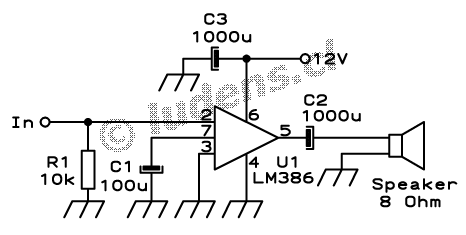
That said, it works great for this application and will actually give your speakers and headphones a little more boost! It's also the easiest circuit to construct ever, take a look here:
http://ludens.cl/Electron/audioamps/LM386.gif

The 10K on the input is a pot for volume control and the 1000uf and the voltage input is just power bypass. the 1000uf on the audio output is an audio crossover and should probably be left out since the PSOne speakers can handle up to 20k. So it's all really straightforward knowing that and best of all it's designed for a 8ohm speaker load! (exactly what PSOne speakers are).

That's the extent of the help I can offer. It's as easy as circuit comes so if you need to know more I suggest doing a little google research ;)
Also to note, you will need 2 of these chips, one for each audio channel.

-Segasonicfan
Post Reply